
Logging a mood
The heatmap grid
The home screen shows a scrollable grid of colored cells, one column per day, seven days wide. Each cell's color reflects your average mood for that day. Brighter, warmer colors tend toward energized and positive; cooler, muted colors toward calm or difficult.
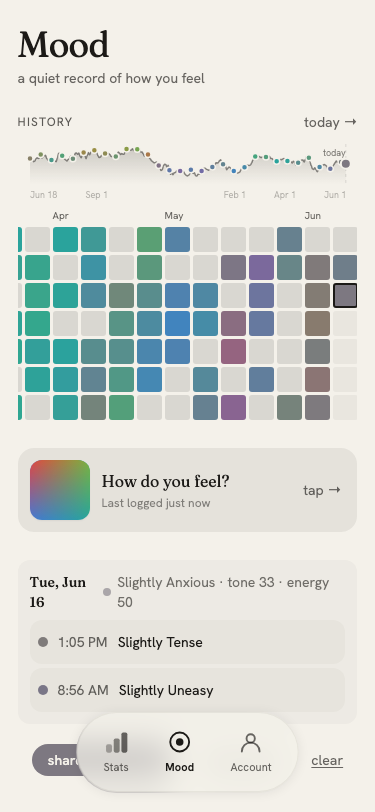
Tap any cell to select that day and see its entries below the grid. Tap today → to scroll back to the current date.
Opening the mood picker
Tap How do you feel? to open the mood picker. The picker is a two-dimensional gradient field:
- Left → right: difficult to pleasant
- Top → bottom: energized to calm
Drag or tap anywhere in the field to place your mood. The dot shows your current selection.
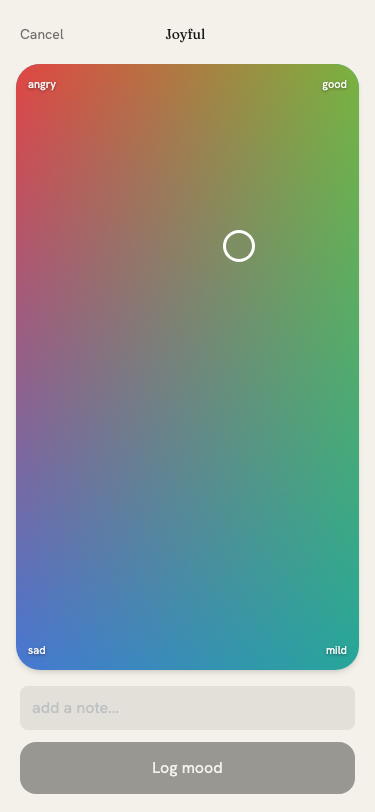
Add an optional note in the field below, then tap Log mood to save. Tap Cancel or press Escape to close without logging.
Logging for a past day
Select a past day in the grid before opening the picker. The header will show which date you are logging for. Backfilled entries are stamped at noon of the selected day.
Entry detail
Tap any row in the day list to open an entry's detail sheet. It shows:
- Mood color and label (e.g. "mildly calm", "energized")
- Time logged
- Your note, or "no note" if none was added
- Moon phase and sign (if astrology is enabled)
Tap Remove to delete the entry permanently.
Multiple entries per day
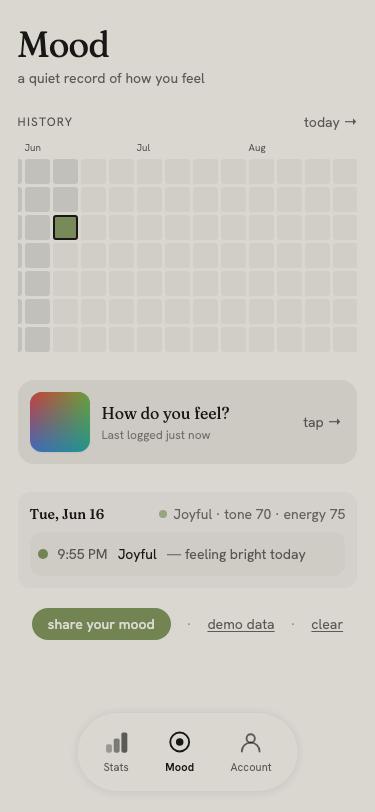
You can log as many moods as you like in a day. The grid cell shows the average color, and the day list shows each entry individually with its time.
Demo data
Tap demo data on the home screen to generate a sample year of mood entries. This is useful for exploring the app before committing real logs. Tap clear to erase all entries.